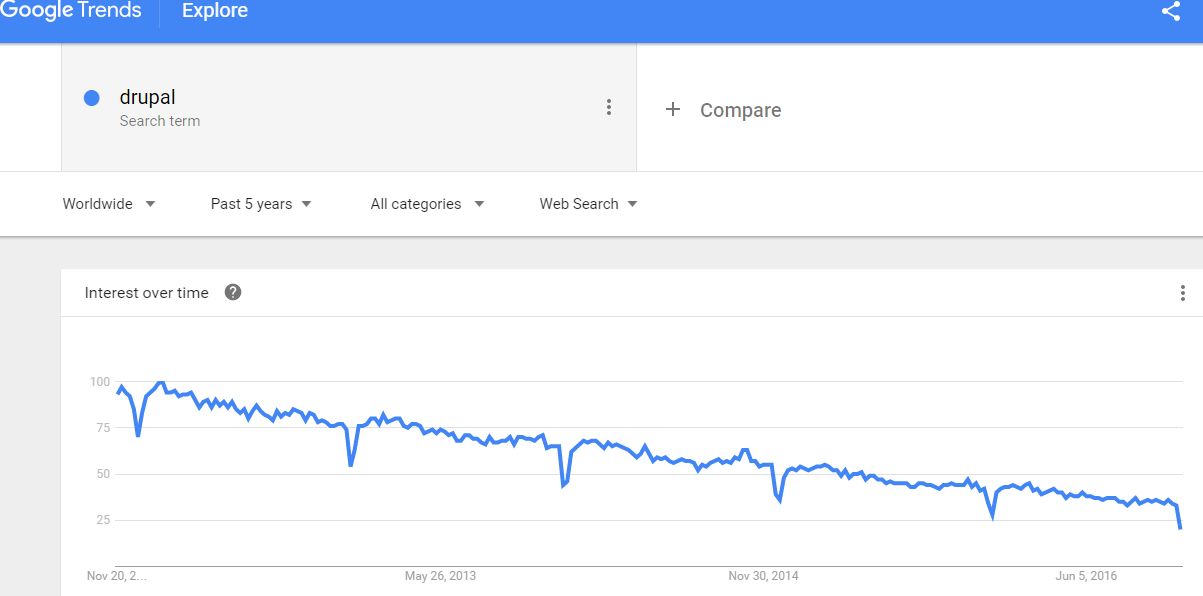
The periodic dip in each chart is end of Dec. every year. Drupal is at 25% of where it started from 5 years ago, but WordPress is about the same. From the simple queries put into Google Trends: drupal & wordpress.
“WordPress is used by 58.5% of all the websites whose content management system we know. This is 27.1% of all websites.” —from w3techs.com. (Drupal is used by 3% of websites.)
A couple interesting posts from a drupal / wordpress developer:
http://mikeschinkel.com/blog/17-reasons-wordpress-is-a-better-cms-than-drupal/
http://mikeschinkel.com/blog/the-decline-of-drupal-or-how-to-fix-drupal-8/
The second link talks about how the author thinks the Drupal collective is following the pattern of how Microsoft destroyed Visual Basic.
Someone asked me this week to talk tech about the CMS platform landscape so I did a little research about Drupal vs WordPress. About 3 years ago I did a demo, and another developer friend advocated Drupal over WordPress so I started working in Drupal. Unfortunately, the learning curve was way steeper than I thought it would be and I ended up coding the demo from scratch since learning Drupal was taking too long.
There’s something to be said for being able to get something working quickly–you can start working productively in WordPress in minutes, and I think that’s one reason why WordPress is so popular.